
Diagnosing BGP Sessions That Won't Come Up
Idle, Active or never? Five ways a BGP session fails on Cisco IOS-XE, and the logs and commands that tell them apart.
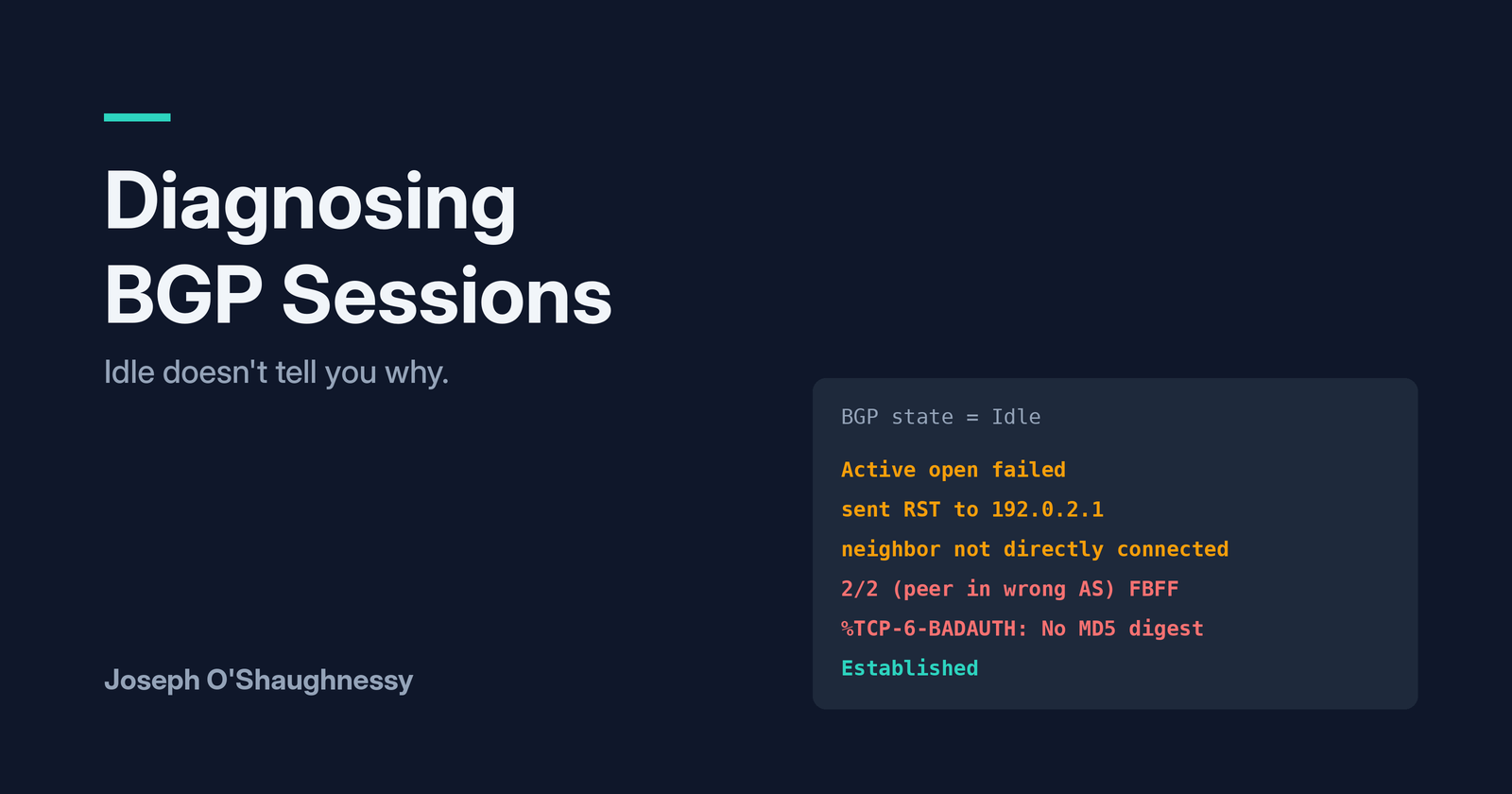
"BGP to the customer is down." It's one of the most common tickets an engineer gets, and the first thing everyone does is run show ip bgp summary and look at the State column.
The trouble is that column tells you much less than it seems to. While building this lab I broke a BGP session five different ways, and four of them showed Idle. The textbook says Active means TCP is failing, but I watched the same fault flip between Active and Idle depending on when I looked. Two of the faults didn't even break the session straight away.
In this post I'll break the session five ways on Cisco IOS-XE and show what actually tells them apart: show ip bgp neighbors, the logs, and one old trick with telnet.
Lab setup
Three routers in Cisco Modeling Labs (CML), set up like a small provider network:
- cust01 is the customer, in AS 64511. It advertises its LAN, 203.0.113.0/24.
- pe01 is the provider edge, in AS 64500. It runs eBGP to the customer over the link between them.
- pe02 is another provider router. It peers with pe01 over iBGP between their loopbacks, which OSPF makes reachable, and advertises the provider's routes (198.51.100.128/25).
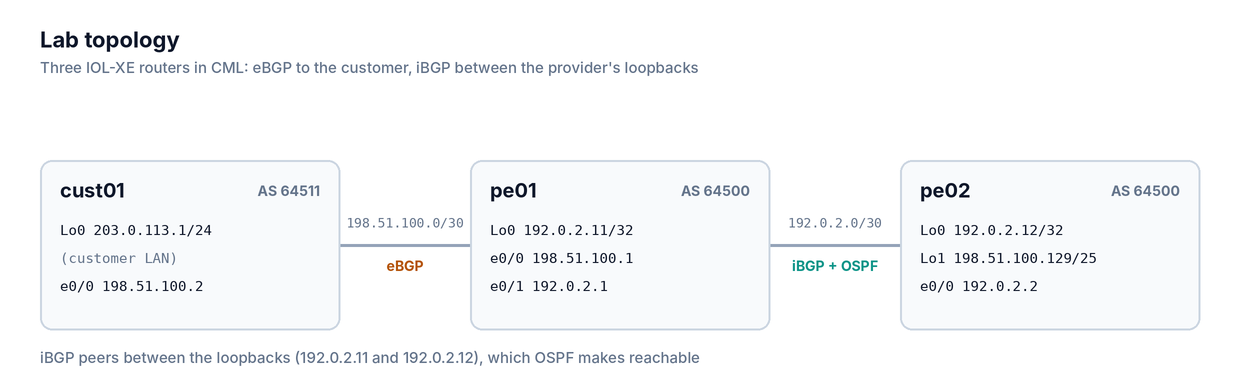
All the addresses and AS numbers come from the ranges reserved for documentation, so nothing clashes with a real network. The routers are IOL-XE 17.16, which comes with CML 2.7 and later, including the free version.
Grab the lab from GitHub. In CML, choose Import, select bgp-session-down.yaml and start the lab. The routers boot with their configs already applied. If you use EVE-NG or GNS3 instead, the configs folder has each router's config as plain text to paste in. The faults.md file has the commands to break and fix each fault in this post.
What healthy looks like
Once the lab is up, check the session from the customer's side:
cust01#show ip bgp summary | begin Neighbor
Neighbor        V           AS MsgRcvd MsgSent   TblVer  InQ OutQ Up/Down  State/PfxRcd
198.51.100.1    4        64500       5       5        2    0    0 00:01:11        1
When a session is up, the last column shows the number of prefixes received 1 instead of a state. Any word in that column, whether Idle, Active, Connect or OpenSent, means the session isn't up.
cust01#show ip route bgp | begin Gateway
Gateway of last resort is not set

      198.51.100.0/24 is variably subnetted, 3 subnets, 3 masks
B        198.51.100.128/25 [20/0] via 198.51.100.1, 00:00:19

cust01#ping 198.51.100.129 source 203.0.113.1
!!!!!
Success rate is 100 percent (5/5), round-trip min/avg/max = 1/1/1 ms
The customer has learned the provider's route, and traffic from the customer LAN gets through. On pe01, both sessions are up:
pe01#show ip bgp summary | begin Neighbor
Neighbor        V           AS MsgRcvd MsgSent   TblVer  InQ OutQ Up/Down  State/PfxRcd
192.0.2.12      4        64500       6       7        4    0    0 00:02:29        1
198.51.100.2    4        64511      22      24        7    0    0 00:15:39        1
If you check straight after boot and see 0 prefixes with the session up, wait 30 seconds. BGP holds back its first updates briefly, so the routes arrive a little after the session comes up.
Fault 1: something is blocking TCP 179
BGP runs over TCP port 179, so anything in the path that blocks that port kills the session: an ACL, a firewall policy, a control plane policy. To simulate it, add an ACL on pe01's customer-facing interface that blocks BGP and allows everything else, then reset the session:
pe01(config)#ip access-list extended CUST01-IN
pe01(config-ext-nacl)# deny tcp any any eq bgp
pe01(config-ext-nacl)# deny tcp any eq bgp any
pe01(config-ext-nacl)# permit ip any any
pe01(config)#interface Ethernet0/0
pe01(config-if)# ip access-group CUST01-IN in
pe01#clear ip bgp 198.51.100.2
Now look from the customer's side:
cust01#show ip bgp summary | begin Neighbor
Neighbor        V           AS MsgRcvd MsgSent   TblVer  InQ OutQ Up/Down  State/PfxRcd
198.51.100.1    4        64500       0       0        1    0    0 00:00:19 Idle

cust01#show ip bgp neighbors 198.51.100.1 | include BGP state|Last reset
  BGP state = Idle, down for 00:00:19
  Last reset 00:00:19, due to Active open failed
If you learned that Active means a TCP problem, this is the first surprise: the state is Idle. On IOS-XE, when the connection attempt fails, the session drops back to Idle and waits before trying again. The clue is in the reason, "Active open failed": the router tried to open a TCP connection and couldn't.
The second surprise, and the one that causes arguments on a ticket:
cust01#ping 198.51.100.1
!!!!!
Success rate is 100 percent (5/5), round-trip min/avg/max = 1/1/1 ms
The link is up and ping works, so it's easy to conclude the network is fine. But ping only proves ICMP gets through. What you actually need to test is TCP port 179, and every Cisco router can do that with telnet:
cust01#telnet 198.51.100.1 179 /source-interface Ethernet0/0
Trying 198.51.100.1, 179 ...
% Destination unreachable; gateway or host down
That came back instantly, which means something actively rejected the connection: the ACL sent back an ICMP unreachable. Now change the ACL to drop silently, which is what most firewalls do, by adding no ip unreachables on pe01's interface:
cust01#telnet 198.51.100.1 179 /source-interface Ethernet0/0
Trying 198.51.100.1, 179 ...
% Connection timed out; remote host not responding
This one hung for a while before giving up. And this time the State column showed Active while the router waited for a reply, then Idle again once it gave up, so the same fault shows a different state depending on when you look. Don't diagnose from one snapshot of that column.
It's the same pattern as in my TCP handshake post: an instant refusal means something is rejecting the connection, and a timeout means something is dropping it. Either way, look for an ACL or a firewall between the two routers. On pe01, the ACL counters give it away:
pe01#show ip access-lists CUST01-IN
Extended IP access list CUST01-IN
    10 deny tcp any any eq bgp (10 matches)
    20 deny tcp any eq bgp any (6 matches)
    30 permit ip any any (10 matches)
Fix: allow TCP 179 between the peers. In the lab, remove the ACL from the interface.
Fault 2: iBGP from the wrong source address
iBGP sessions usually peer between loopbacks, so the session survives if one physical link fails. For that to work, each router has to send its BGP packets from its loopback, which is what update-source Loopback0 does. Without it, the router uses the address of whichever interface the packet leaves by.
Start by removing it on pe02 only:
pe02(config)#router bgp 64500
pe02(config-router)# no neighbor 192.0.2.11 update-source Loopback0
pe02#clear ip bgp 192.0.2.11
pe02#show ip bgp summary | begin Neighbor
Neighbor        V           AS MsgRcvd MsgSent   TblVer  InQ OutQ Up/Down  State/PfxRcd
192.0.2.11      4        64500       5       5        7    0    0 00:00:09        1
It came straight back up, with the config wrong. Look at which side opened the connection:
pe02#show ip bgp neighbors 192.0.2.11 | include Last reset|Local host|Foreign host
  Last reset 00:00:21, due to Active open failed
Local host: 192.0.2.12, Local port: 179
Foreign host: 192.0.2.11, Foreign port: 53028
pe02 is on port 179, so it was the side answering. pe01, which still has the right config, opened the connection from its loopback, and that worked. pe02's own attempts failed ("Active open failed"), but as long as one side gets through, the session comes up.
That's a fault waiting to happen. Months later, someone tidies up pe01's config the same way:
pe01(config)#router bgp 64500
pe01(config-router)# no neighbor 192.0.2.12 update-source Loopback0
pe01#clear ip bgp 192.0.2.12
pe01#show ip bgp summary | begin Neighbor
Neighbor        V           AS MsgRcvd MsgSent   TblVer  InQ OutQ Up/Down  State/PfxRcd
192.0.2.12      4        64500       0       0        1    0    0 00:00:18 Idle
198.51.100.2    4        64511      23      25        8    0    0 00:16:35        1

pe01#show ip bgp neighbors 192.0.2.12 | include BGP state|Last reset
  BGP state = Idle, down for 00:00:18
  Last reset 00:00:18, due to Active open failed

pe01#ping 192.0.2.12 source Loopback0
!!!!!
Success rate is 100 percent (5/5), round-trip min/avg/max = 1/1/1 ms
The loopbacks can reach each other, OSPF is fine, and the state and reason are identical to fault 1. show commands won't tell these two apart, but a debug on pe02 will:
pe02#debug ip tcp transactions
pe02#debug ip bgp

TCP: sent RST to 192.0.2.1:17036 from 192.0.2.12:179
BGP: 192.0.2.11 open active, local address 192.0.2.2
TCP0: state was CLOSED -> SYNSENT [52409 -> 192.0.2.11(179)]
TCP0: state was SYNSENT -> CLOSED [52409 -> 192.0.2.11(179)]
BGP: 192.0.2.11 open failed: Connection refused by remote host
The first line is pe02 resetting pe01's connection, because it arrived from 192.0.2.1, pe01's physical interface, and pe02 only accepts BGP from the address it has configured as the neighbour, 192.0.2.11. The second line shows pe02 making the same mistake: local address 192.0.2.2, its own physical interface, so pe01 refuses that one too.
In a busy production router, debug ip bgp can produce a lot of output, so in real life limit it to one neighbour (debug ip bgp 192.0.2.11) and turn it off afterwards with undebug all.
Fix: put update-source Loopback0 back on both sides. Then check for the other common cause with the same symptoms: a typo in the neighbour address, which you'll spot by comparing show run | section router bgp on each side with the other router's loopback address.
Fault 3: eBGP to a loopback without multihop
Sometimes the eBGP session to a customer is moved to loopbacks, often to load-balance over two links. The usual mistake is to change the neighbour addresses and add the routes to reach the other side's loopback, but forget that eBGP expects its neighbour to be directly connected.
On cust01 (pe01 gets the mirror image, pointing at 203.0.113.1):
cust01(config)#ip route 192.0.2.11 255.255.255.255 198.51.100.1
cust01(config)#router bgp 64511
cust01(config-router)# no neighbor 198.51.100.1
cust01(config-router)# neighbor 192.0.2.11 remote-as 64500
cust01(config-router)# neighbor 192.0.2.11 update-source Loopback0
cust01(config-router)# address-family ipv4
cust01(config-router-af)#  neighbor 192.0.2.11 activate
cust01#ping 192.0.2.11 source Loopback0
!!!!!
Success rate is 100 percent (5/5), round-trip min/avg/max = 1/1/1 ms

cust01#show ip bgp summary | begin Neighbor
Neighbor        V           AS MsgRcvd MsgSent   TblVer  InQ OutQ Up/Down  State/PfxRcd
192.0.2.11      4        64500       0       0        1    0    0 never    Idle
Idle again, but this time the Up/Down column says never. In faults 1 and 2, the session was trying and failing. Here, it has never tried at all. The neighbour detail explains why:
cust01#show ip bgp neighbors 192.0.2.11 | include BGP state|Last reset|External BGP neighbor
  BGP state = Idle, down for never
  Last reset never
  External BGP neighbor not directly connected.
  External BGP neighbor configured for connected checks (single-hop no-disable-connected-check)
By default, an eBGP neighbour has to be on a directly connected subnet. 192.0.2.11 isn't, so the router doesn't even try to connect. That's why the timers say "never": no connection attempt, no reset, nothing for an ACL to block. If you see "never" next to an eBGP neighbour, look at the config before you look at the network.
Fix: tell BGP the neighbour is further away, on both sides:
cust01(config)#router bgp 64511
cust01(config-router)# neighbor 192.0.2.11 ebgp-multihop 2
cust01#show ip bgp neighbors 192.0.2.11 | include BGP state|External BGP neighbor
  BGP state = Established, up for 00:00:14
  External BGP neighbor may be up to 2 hops away.
If the loopbacks are only one physical link apart, as here, neighbor ... disable-connected-check works too and is more precise: it skips the connected check but leaves the TTL at 1.
Fault 4: the wrong AS number
One mistyped digit on a new customer turn-up. pe01 has the customer as AS 64510 instead of 64511:
pe01(config)#router bgp 64500
pe01(config-router)# neighbor 198.51.100.2 remote-as 64510
pe01#show ip bgp summary | begin Neighbor
Neighbor        V           AS MsgRcvd MsgSent   TblVer  InQ OutQ Up/Down  State/PfxRcd
192.0.2.12      4        64500       8       8       12    0    0 00:03:02        1
198.51.100.2    4        64510       0       0        1    0    0 never    Idle
Idle and "never", which at a glance looks exactly like fault 3. But this time TCP works fine. The routers connect, exchange OPEN messages, and one of them objects to what's inside. That's reported in the logs, on both routers:
pe01#show logging | include 198.51.100.2
%BGP-3-NOTIFICATION: sent to neighbor 198.51.100.2 passive 2/2 (peer in wrong AS) 2 bytes FBFF
%BGP-5-NBR_RESET: Neighbor 198.51.100.2 passive reset (BGP Notification sent)
%BGP-5-ADJCHANGE: neighbor 198.51.100.2 passive Down BGP Notification sent
cust01#show logging | include 198.51.100.1
%BGP-3-NOTIFICATION: received from neighbor 198.51.100.1 active 2/2 (peer in wrong AS) 2 bytes FBFF
%BGP-5-NBR_RESET: Neighbor 198.51.100.1 active reset (BGP Notification received)
A NOTIFICATION is BGP's way of saying "I'm closing this session, and here's why". The 2/2 is the error code: 2 is an error in the OPEN message, and subcode 2 is a bad peer AS. "Sent" tells you which side found the problem, so pe01 is the router whose config disagrees.
The most useful part is the last bit. FBFF is the AS number the peer actually sent, in hex. Convert it:
FBFF hex = 64,511
So the log tells you not only that the AS is wrong, but what it should be. If the other side is a customer router you can't log in to, that saves a phone call.
The repeated messages are the session being torn down and retried every few seconds. If your log is filling up with NOTIFICATIONs for one neighbour, read one of them before you start changing things.
Fix: correct the remote-as on whichever side sent the NOTIFICATION. In the lab, that's neighbor 198.51.100.2 remote-as 64511 on pe01.
Fault 5: the MD5 password
Many providers protect customer BGP sessions with an MD5 password, which both sides have to agree on. This fault had the biggest surprise of the five.
With the session up, add a password on pe01 only, as if the provider has made its half of a change and the customer hasn't yet:
pe01(config)#router bgp 64500
pe01(config-router)# neighbor 198.51.100.2 password LabSecret1
pe01#show ip bgp summary | begin Neighbor
Neighbor        V           AS MsgRcvd MsgSent   TblVer  InQ OutQ Up/Down  State/PfxRcd
192.0.2.12      4        64500       9      10       13    0    0 00:04:38        1
198.51.100.2    4        64511       5       5       13    0    0 00:00:45        1
It's still up. The log explains why:
%BGP-4-BGP_SESSION_PARSE: Failed to parse password neighbor config for neighbor 198.51.100.2 IPv4 Unicast (Password configuration changed for neighbor. Session reset required for change to take effect.)
IOS-XE doesn't apply the password to a session that's already up. That makes for a nasty kind of outage: the change goes in, everything looks fine, and the session only breaks the next time it resets, which could be a link flap or a reload weeks later. By then, nobody connects it to the password change.
Simulate that reset:
pe01#clear ip bgp 198.51.100.2
pe01#show ip bgp summary | begin Neighbor
Neighbor        V           AS MsgRcvd MsgSent   TblVer  InQ OutQ Up/Down  State/PfxRcd
192.0.2.12      4        64500      10      12       14    0    0 00:05:16        1
198.51.100.2    4        64511       0       0        1    0    0 00:00:15 Active

pe01#show logging | include BADAUTH
%TCP-6-BADAUTH: No MD5 digest from 198.51.100.2(179) to 198.51.100.1(37541) tableid - 0
%TCP-6-BADAUTH: No MD5 digest from 198.51.100.2(179) to 198.51.100.1(37541) tableid - 0
%TCP-6-BADAUTH: No MD5 digest from 198.51.100.2(13811) to 198.51.100.1(179) tableid - 0
This time the State column does say Active, and the log gives a clear reason: TCP segments are arriving from the customer without the MD5 signature pe01 now expects, so pe01 throws them away.
Now check the customer's router:
cust01#show ip bgp summary | begin Neighbor
Neighbor        V           AS MsgRcvd MsgSent   TblVer  InQ OutQ Up/Down  State/PfxRcd
198.51.100.1    4        64500       0       0        1    0    0 00:00:31 Active

cust01#show logging | include BADAUTH

cust01#
Nothing. Only the side with the password logs the problem. If you're the provider and you ask the customer to check their logs, they'll find nothing wrong, so always check your own side first.
If both sides have a password but they don't match, you get a slightly different message, and this time it's logged on both routers:
cust01#show logging | include BADAUTH
%TCP-6-BADAUTH: Invalid MD5 digest from 198.51.100.1(29794) to 198.51.100.2(179) tableid - 0
So "No MD5 digest" means the other side has no password at all, and "Invalid MD5 digest" means it has the wrong one.
Fix: set the same password on both sides, then reset the session. When you change a BGP password in production, reset the session yourself during the change window, so you know it works before you close the change.
Quick reference
| State | Up/Down | What else you see | Likely cause |
|---|---|---|---|
| Idle, or flipping Active/Idle | Counting up | "Active open failed". Ping works, but telnet <peer> 179 is refused or times out |
ACL or firewall blocking TCP 179 |
| Idle | Counting up | "Active open failed". Loopback-to-loopback ping works, but debug shows local address is a physical interface and the peer sends an RST |
Missing update-source, or a typo in the neighbour address |
| Idle | never | "External BGP neighbor not directly connected" | eBGP to a loopback without ebgp-multihop |
| Idle | never | Log: NOTIFICATION ... 2/2 (peer in wrong AS) 2 bytes XXXX |
Wrong remote-as. Convert XXXX from hex to get the AS the peer sent |
| Active | Counting up | Log: %TCP-6-BADAUTH: No MD5 digest or Invalid MD5 digest, on the side with the password |
MD5 password missing on one side, or mismatched |
And the commands that told them apart:
show ip bgp neighbors <peer> | include BGP state|Last reset|External BGPfor the state, why it last reset, and the connected checkshow logging | include BGP|BADAUTHfor NOTIFICATIONs and MD5 errorstelnet <peer> 179 /source-interface <int>to test TCP 179 itself, not just pingdebug ip tcp transactionsanddebug ip bgp <peer>for the source address and resets, when nothing else explains it
Wrapping up
Four of these five faults showed Idle. Active only appeared briefly while a silently dropped SYN was waiting to time out, and for the MD5 password once the session had been reset. So when a ticket says "BGP is down", treat the State column as a starting point, not an answer. Check the Up/Down column for "never", read the last reset reason, look for NOTIFICATIONs and BADAUTH messages in the log, and test TCP 179 directly instead of trusting ping.
Two of the faults, the one-sided update-source and the MD5 password, didn't break anything straight away. Faults like these are why a session that has run fine for months can suddenly stop coming back after a reload. If you're making either change, reset the session before you close the change, while you're still watching it.
When you're done, stop and wipe the lab in CML.
About the author
- Network engineer at an MSP, after starting out in the core network team at a small ISP. I lab things at home, break them, and write up what I learn, from packet captures and firewalls to routing and troubleshooting.
Comments
Join the discussionNo comments yet. Be the first to comment.