
Finding an MTU Black Hole with ping, tcpdump and Wireshark
Why big transfers hang when ping works, and three ways to fix it
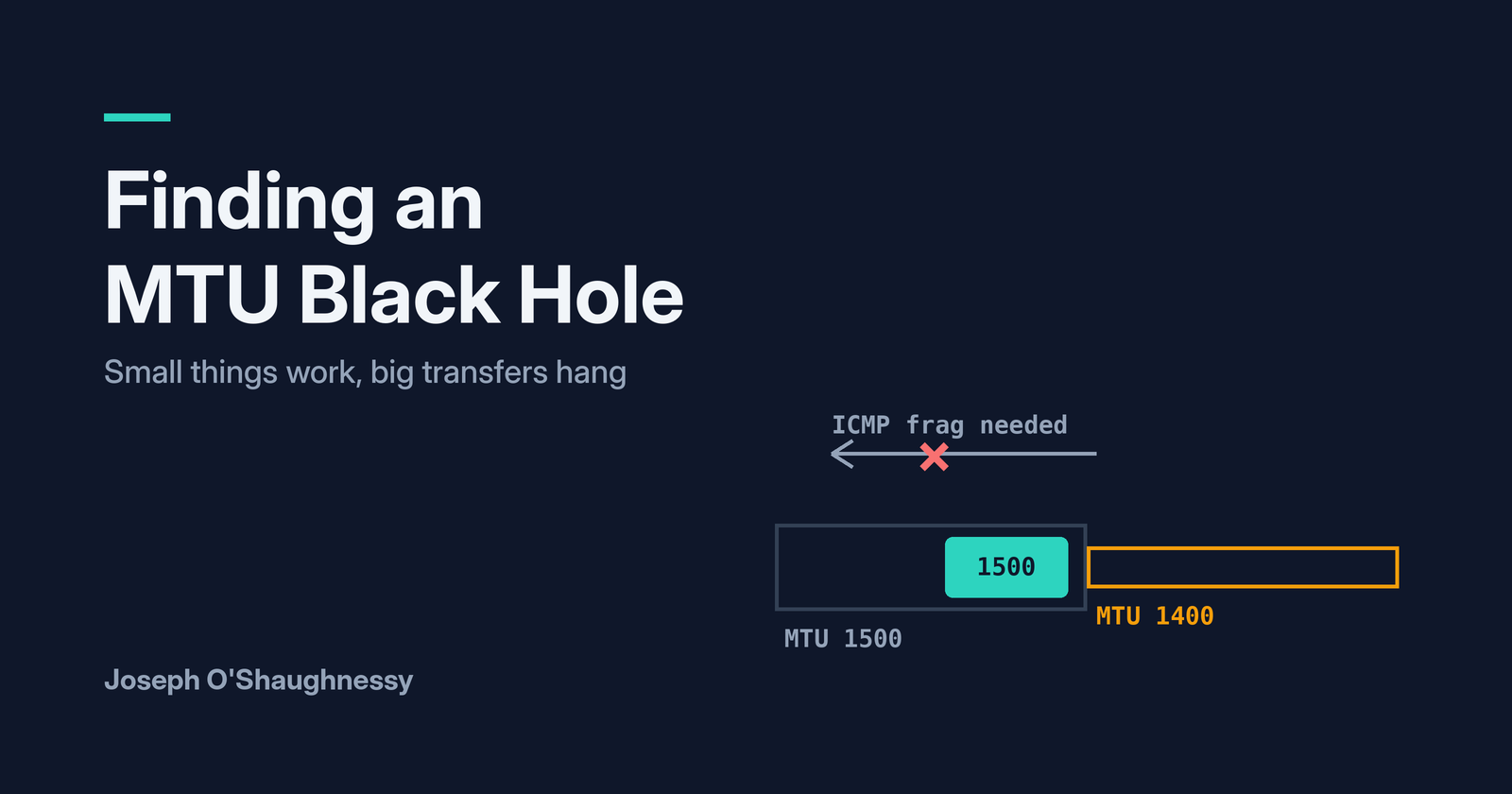
You can SSH to the server. The login page loads. Ping works. But the moment someone downloads a large file or opens a big report, it just sits there, and eventually times out. Everyone swears the network is fine, because "I can ping it".
That pattern, where small things work and big things hang, is almost always an MTU problem, and usually a specific one: a Path MTU Discovery black hole. In this post I'll build one in a lab, show exactly what it looks like in ping and in a packet capture, and test three ways of fixing it.
How Path MTU Discovery is meant to work
The MTU (maximum transmission unit) is the biggest IP packet a link will carry. On normal Ethernet that's 1500 bytes. Tunnels, PPPoE, VPNs and some WAN links have less room, often somewhere between 1400 and 1492.
Modern hosts send TCP traffic with the Don't Fragment (DF) bit set. So when a 1500-byte packet reaches a router whose next link only takes 1400, the router can't split it. It drops the packet and sends an ICMP message back to the sender: type 3, code 4, "fragmentation needed", which includes the MTU it can handle. The sender caches that value and resends smaller packets. That's Path MTU Discovery (PMTUD).
web01 (1500)      rtr02             1400 link              client01
  | -- 1500 bytes, DF --> |                                    |
  | <-- ICMP 3/4, mtu 1400 |                                    |
  | -- 1400 bytes, DF ----------------------------------------> |
It all hinges on that ICMP message getting back. If a firewall somewhere drops it, and plenty block ICMP wholesale, the sender never finds out. It keeps sending 1500-byte packets that keep vanishing. That's the black hole.
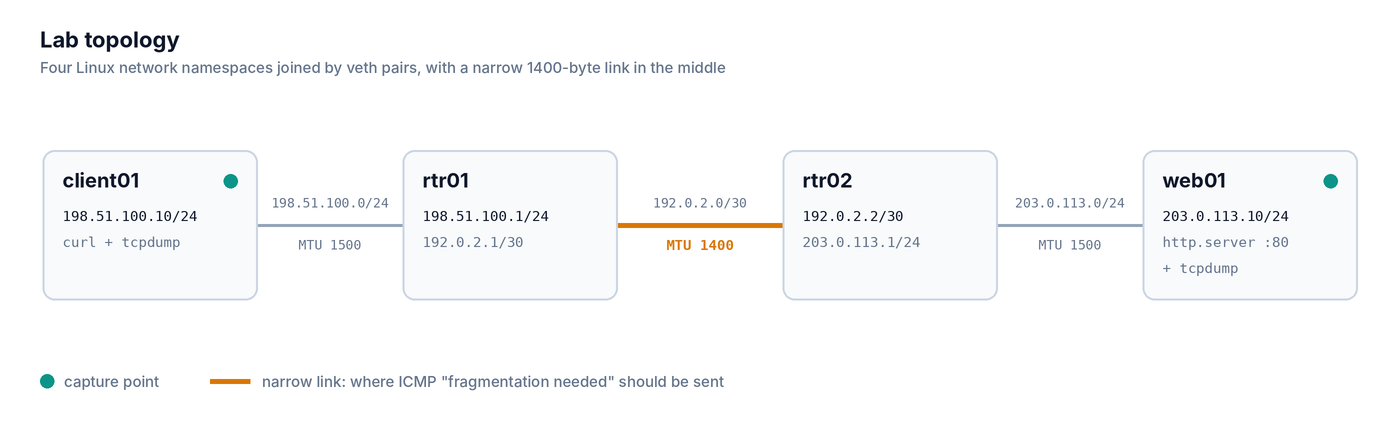
One detail matters for the lab: the narrow link has to be in the middle of the path. If it's on one of the end hosts, TCP's MSS negotiation during the handshake quietly works around it, and you never see a problem.
Lab setup
Same approach as my TCP handshake post: Linux network namespaces on one machine, no VMs. This time there are four of them in a line, with a 1400-byte link between the two routers:
Save this as mtu-lab.sh and run it with sudo bash mtu-lab.sh, or grab it, along with a cleanup script, from GitHub:
#!/bin/bash
# client01 -- rtr01 ==(1400 MTU link)== rtr02 -- web01
set -e
for ns in client01 rtr01 rtr02 web01; do
  ip netns add $ns
  ip netns exec $ns ip link set lo up
done

ip link add c0  type veth peer name r1a
ip link add r1b type veth peer name r2a
ip link add r2b type veth peer name w0
ip link set c0  netns client01
ip link set r1a netns rtr01
ip link set r1b netns rtr01
ip link set r2a netns rtr02
ip link set r2b netns rtr02
ip link set w0  netns web01

ip netns exec client01 ip addr add 198.51.100.10/24 dev c0
ip netns exec rtr01    ip addr add 198.51.100.1/24  dev r1a
ip netns exec rtr01    ip addr add 192.0.2.1/30     dev r1b
ip netns exec rtr02    ip addr add 192.0.2.2/30     dev r2a
ip netns exec rtr02    ip addr add 203.0.113.1/24   dev r2b
ip netns exec web01    ip addr add 203.0.113.10/24  dev w0

# the narrow link in the middle of the path
ip netns exec rtr01 ip link set r1b mtu 1400
ip netns exec rtr02 ip link set r2a mtu 1400

ip netns exec client01 ip link set c0  up
ip netns exec rtr01    ip link set r1a up
ip netns exec rtr01    ip link set r1b up
ip netns exec rtr02    ip link set r2a up
ip netns exec rtr02    ip link set r2b up
ip netns exec web01    ip link set w0  up

ip netns exec client01 ip route add default via 198.51.100.1
ip netns exec web01    ip route add default via 203.0.113.1
ip netns exec rtr01    ip route add 203.0.113.0/24 via 192.0.2.2
ip netns exec rtr02    ip route add 198.51.100.0/24 via 192.0.2.1
ip netns exec rtr01    sysctl -qw net.ipv4.ip_forward=1
ip netns exec rtr02    sysctl -qw net.ipv4.ip_forward=1
Then give web01 a small file and a 2 MB file to serve:
mkdir -p ~/mtu-www && cd ~/mtu-www
echo hello > small.txt
head -c 2000000 /dev/urandom > big.bin
sudo ip netns exec web01 python3 -m http.server 80 &
One thing worth doing before you capture anything: turn off segmentation offload on the two end hosts. Otherwise the kernel hands tcpdump huge "packets" of 7,000+ bytes before splitting them up, which makes an MTU post very confusing to read.
sudo apt install -y ethtool
sudo ip netns exec web01    ethtool -K w0 tso off gso off gro off
sudo ip netns exec client01 ethtool -K c0 tso off gso off gro off
When you're done, remove everything with:
for ns in client01 rtr01 rtr02 web01; do sudo ip netns del $ns; done
Healthy baseline
Before breaking anything, check that PMTUD works when ICMP is allowed. Both downloads should succeed:
sudo ip netns exec client01 curl -s -o /dev/null -m 10 -w "%{http_code} %{size_download} bytes\n" http://203.0.113.10/small.txt
sudo ip netns exec client01 curl -s -o /dev/null -m 10 -w "%{http_code} %{size_download} bytes\n" http://203.0.113.10/big.bin
Now send a full-size ping with DF set. -M do sets DF, and -s 1472 plus 28 bytes of IP and ICMP headers makes a 1500-byte packet:
sudo ip netns exec client01 ping -c1 -M do -s 1472 203.0.113.10
It doesn't get through, but it tells you why:
From 198.51.100.1 icmp_seq=1 Frag needed and DF set (mtu = 1400)
That's rtr01 doing its job: it can't push 1500 bytes onto the 1400-byte link, so it says so. tracepath finds the same thing hop by hop:
sudo ip netns exec client01 tracepath -n 203.0.113.10
 1?: [LOCALHOST]                      pmtu 1500
 1:  198.51.100.1                     0.026ms
 2:  198.51.100.1                     0.004ms pmtu 1400
 2:  192.0.2.2                        0.010ms
 3:  203.0.113.10                     0.009ms reached
     Resume: pmtu 1400 hops 3 back 3
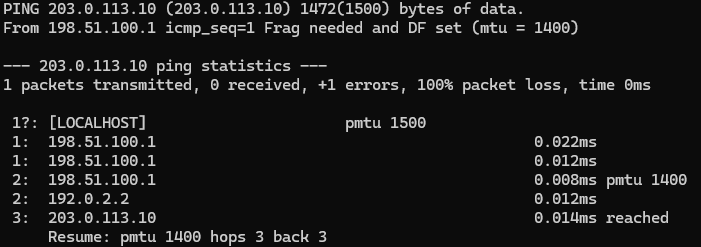
This is the behaviour you want on a real network: something tells you the path is smaller, and everything adjusts.
Break it
Now do what so many firewalls do by accident: drop the ICMP "fragmentation needed" messages. Add this on both routers:
sudo ip netns exec rtr01 iptables -A OUTPUT -p icmp --icmp-type fragmentation-needed -j DROP
sudo ip netns exec rtr02 iptables -A OUTPUT -p icmp --icmp-type fragmentation-needed -j DROP
Linux caches the path MTU it learned a minute ago, so clear that too, or the hosts will carry on using 1400 and hide the problem:
sudo ip netns exec client01 ip route flush cache
sudo ip netns exec web01    ip route flush cache
Run the two downloads again. The small file still works. The big one hangs, then curl gives up:
200 6 bytes
000 0 bytes
That's the symptom from the intro, reproduced. The connection opens fine, the request goes up fine, and then the download never arrives.
Diagnose it
Step 1: ping with different sizes
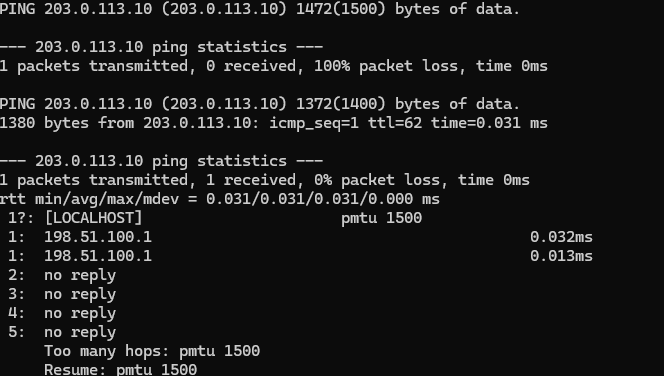
The quickest test needs nothing but ping. Try the full-size DF ping again:
sudo ip netns exec client01 ping -c1 -W1 -M do -s 1472 203.0.113.10
This time there's no "Frag needed" message. It just fails: 100% packet loss. Now try a smaller one:
sudo ip netns exec client01 ping -c1 -W1 -M do -s 1372 203.0.113.10
That works. 1372 plus 28 bytes of headers is exactly 1400. So small packets get through, full-size ones vanish without a word. On a real network you don't know the magic number, so you halve the gap between a size that works and one that fails until you find the largest one that gets through. That's your path MTU.
tracepath gives another hint. With the ICMP blocked, it never learns the smaller MTU, so its full-size probes die after the first router:
 1?: [LOCALHOST]                      pmtu 1500
 1:  198.51.100.1                     0.047ms
 2:  no reply
 3:  no reply
     Too many hops: pmtu 1500
Hop 1 still answers, but everything beyond the narrow link goes quiet, and it still believes the path is 1500. A path that "dies" at the same hop for big packets but not for a normal ping is a strong MTU signal.
Step 2: capture at both ends
This is where it clicks. Start a capture on each end host, then run the big download:
sudo ip netns exec client01 tcpdump -i c0 -w client.pcap tcp port 80 or icmp &
sudo ip netns exec web01    tcpdump -i w0 -w server.pcap tcp port 80 or icmp &
sudo ip netns exec client01 curl -s -o /dev/null -m 10 http://203.0.113.10/big.bin
Stop both captures afterwards with sudo pkill tcpdump.
The client sees a perfectly normal handshake, sends its GET, and receives the first small segment with the HTTP headers. Then nothing at all, until curl gives up 10 seconds later and closes the connection.

The server tells the real story. It's sending data in full-size 1,500-byte packets (1,448 bytes of TCP payload), getting no acknowledgement, and retransmitting the same segment with a growing gap: at about 0.2, 0.6, 1.5, 3.1 and then 6.6 seconds in my lab, roughly doubling each time.

Three Wireshark filters make this obvious on a busy capture:
| Filter | What it tells you |
|---|---|
tcp.analysis.retransmission && ip.len > 1400 |
Big packets being retransmitted: the core symptom |
icmp.type == 3 && icmp.code == 4 |
Any "fragmentation needed" messages. In a black hole this shows nothing, and that absence is the clue |
tcp.len > 0 |
Whether any data is actually arriving at the client |
Put together: the handshake works because SYN packets are tiny, the request works because it's small, and the response dies because it's the first thing big enough to hit the 1400-byte link. And since the ICMP message is being dropped, nobody is ever told.
Fix it
I tested three fixes. Between each one, undo the previous fix and run ip route flush cache on client01 and web01, so each test starts clean.
Fix 1: stop dropping the ICMP (the proper fix)
Remove the rule from both routers:
sudo ip netns exec rtr01 iptables -D OUTPUT -p icmp --icmp-type fragmentation-needed -j DROP
sudo ip netns exec rtr02 iptables -D OUTPUT -p icmp --icmp-type fragmentation-needed -j DROP
The big download now finishes in about 7 milliseconds. PMTUD does its job again.
On a real network, this means allowing ICMP type 3 code 4 through every firewall in the path, and ICMPv6 type 2 (Packet Too Big) if you run IPv6. Blocking all ICMP feels secure, but these messages are part of how IP works.
Fix 2: MSS clamping on the routers
Sometimes you can't fix the firewall that's dropping ICMP, because it isn't yours. MSS clamping works around it. The router rewrites the Maximum Segment Size (MSS) in the TCP handshake so neither end ever sends segments too big for the path:
sudo ip netns exec rtr01 iptables -t mangle -A FORWARD -p tcp --tcp-flags SYN,RST SYN -j TCPMSS --clamp-mss-to-pmtu
sudo ip netns exec rtr02 iptables -t mangle -A FORWARD -p tcp --tcp-flags SYN,RST SYN -j TCPMSS --clamp-mss-to-pmtu
With the ICMP still blocked, the big download works again, in about 8 milliseconds. You can see why in the capture: web01 offers an MSS of 1460, but the SYN-ACK that reaches client01 says 1360, which is 1400 minus 40 bytes of IP and TCP headers.

This is the standard fix on VPN, PPPoE and tunnel edges. Cisco IOS does the same with ip tcp adjust-mss on an interface, and FortiGate with set tcp-mss-sender and set tcp-mss-receiver on a firewall policy. The catch: it only helps TCP, and only for traffic passing through the device doing the clamping.
Fix 3: TCP MTU probing on the server
Linux can also find the path MTU without ICMP at all, by probing with different segment sizes and watching what gets acknowledged:
sudo ip netns exec web01 sysctl -w net.ipv4.tcp_mtu_probing=1
With ICMP still blocked and no clamping, the download does finish, but it took about 6.3 seconds in my lab, against 7 milliseconds with Fix 1. The server only starts probing after its normal retransmissions fail. It's a reasonable safety net on servers you control, not a fix.
| Fix | Where | Result in the lab | Best for |
|---|---|---|---|
| Allow ICMP type 3 code 4 | Every firewall in the path | About 7 ms | The real fix, wherever you control the firewall |
| MSS clamping | Router or firewall on the narrow link | About 8 ms, TCP only | VPN, PPPoE and tunnel edges; paths you don't control |
| TCP MTU probing | The sending host | Works, but about 6.3 s | A safety net on your own servers |
Quick reference
| Check | Command | Black hole looks like |
|---|---|---|
| Full-size packet with DF | ping -M do -s 1472 <host> |
Fails silently, no "Frag needed" reply |
| Smaller packet with DF | ping -M do -s 1372 <host> |
Works; keep adjusting to find the largest size that does |
| Path MTU per hop | tracepath -n <host> |
Shows pmtu 1500, then "no reply" for every hop past the narrow link |
| Server-side capture | tcp.analysis.retransmission && ip.len > 1400 |
Full-size segments retransmitted with a growing gap |
| ICMP in the capture | icmp.type == 3 && icmp.code == 4 |
Nothing at all |
Wrapping up
If small things work and big things hang, think MTU before anything else. Ping with DF set at a few sizes, capture at both ends, and look for big retransmitted packets with no "fragmentation needed" message anywhere. Then fix it properly by letting ICMP type 3 code 4 through, and use MSS clamping where you can't.
About the author
- Network engineer at an MSP, after starting out in the core network team at a small ISP. I lab things at home, break them, and write up what I learn, from packet captures and firewalls to routing and troubleshooting.
Comments
Join the discussionNo comments yet. Be the first to comment.